




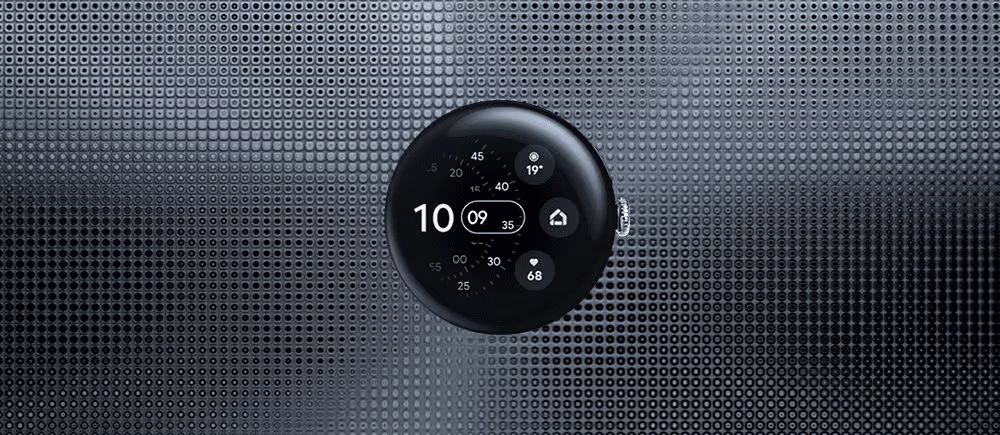
Pixel Watch Understands the Charm of Imperfection
Why I Got It

At the end of 2022, the Pixel Watch debuted at Google’s developer conference, playing a supporting role in the product ecosystem. The moment I saw it, I knew I was going to buy it. Early 2023, I spotted a brand-new, unopened one on a second-hand platform. The seller, having imported it through overseas channels, quickly assumed I was a reseller and refused to sell it to me, even though I genuinely wanted it. I had to let it go. After idly passing the new year and finishing my work, it was already 2024. The Pixel Watch 2 had been released, but to my surprise, Google downgraded the mid-frame to aluminum for weight reduction, switched to contact-based charging for faster speeds, and reduced the screen resolution from 450×450 to 384×384, supposedly for better battery life. I couldn’t wrap my head around that decision. So, I knew it was time to grab the first-gen. Fresh stock was everywhere thanks to imports, and I found a good deal with a personal seller who I got along with—there was no way I wasn’t buying it at this point.
Service Integration
After Google acquired Fitbit, they didn’t integrate Fitbit’s services into Google Fit, which means the Pixel Watch offers two separate data analysis services. It feels like a repeat of Xiaomi’s Mi Band 8 situation after Amazfit went independent. Xiaomi had no choice, but they eventually moved towards their own platform. I have no idea what Google’s business strategy is, but there’s been no real progress on this front—Fitbit remains just Fitbit.
Subscription Service
Here comes the most frustrating part. New devices come with six months of Fitbit Premium subscription (I got 90 days with my second-hand watch). It’s fine for testing out the service, but it feels a bit uncomfortable from a user’s perspective.
Pairing Experience
Follow the instructions to pair the watch, and the experience is fairly standard, similar to other devices in this category. The onboarding is designed to leave a good first impression.
Battery Life
Battery life is a bit of an issue. While it’s advertised as lasting all day, light standby use (with just Bluetooth on) was fine for me. However, when I pushed it—Bluetooth, WiFi, eSIM all on, gaming, scrolling through TikTok, listening to music—it lasted only two hours. The 294mAh lithium battery takes 80 minutes to fully charge. It’s manageable, and now I’m in the habit of charging it daily, just like with my Apple Watch. I’d say it successfully matches Apple Watch Series in this regard.
Appearance Impressions
I have a love-hate relationship with the design. I bought this watch purely for its looks—a round dial with Gorilla Glass 5 that feels as smooth and rounded as a hand-polished pebble. If only it had a sapphire crystal, it would be unbeatable. The fluoroelastomer band with no lugs and the seamless frame give off a strong minimalist, tech-forward vibe, akin to a unique interpretation of Apple Watch’s design. It perfectly embodies Material Design’s clean and intuitive principles. A smartwatch should look like a smartwatch—disguising one as a mechanical watch feels jarring (I’m looking at you, Huawei). Maybe I’m not the target audience for those, but I personally love Pixel Watch’s aesthetic.
Unfortunately, it only comes in a 41mm model. I have thicker wrists, so having a larger version would have been ideal.
The most annoying part? The bezel, which is just as massive and obtrusive as the first-gen Apple Watch. Apple released that back in 2014, and Google, what are you doing, paying homage eight years later? Even worse, the Pixel Watch 2 still has the same thick bezel, making me suspect Google’s following the same slow incremental design approach.
Watch Straps
There’s a decent selection of official and third-party straps, so pick whichever suits your style—nothing much to say here.
Watch Faces
You can tell the official watch faces are thoughtfully designed. If I were to recommend, I’d say go for “Shapes,” “Concentric,” or “Digits.” The third-party options are even more abundant—if you’re willing to pay, you could wear a different face every day.
Internal View
The official marketing shots look slick.
But third-party teardowns reveal that the internal components look quite cheap, like something assembled in a small factory.
Main Features
Notification Sync
Calls, messages, and notifications all come with distinct vibration patterns. You can read detailed messages from WeChat and QQ once you install the watch apps, and even reply directly. But with such a tiny screen, I’m fine just reading the content and leaving replies to my phone. Over the past few months, I haven’t missed any notifications.
Always-On Display
I recommend turning on the always-on display (AOD). It supports AOD, so you can glance at the time without any fuss. The battery drain is minimal—it’s a fair trade for a better experience.
Vibration Feedback
Speaking of vibrations, I have to mention the crown’s haptic feedback, which is my biggest disappointment. Compared to the Apple Watch, it feels way too weak. Apple’s feels like turning a real mechanical crown with perfect tactile feedback. Google, you’ve got to step it up. The alarm vibration is decent, though—strong enough to wake me up.
Activity Tracking
Now for fitness tracking—I’m a homebody and hate exercising, so the Pixel Watch is just a glorified pedometer for me, haha. I haven’t used features like running, swimming, or cycling modes, so I don’t have much to share. I’ve heard reports of slight inaccuracies in activity tracking, likely due to Google Maps’ poor performance in China and the watch’s single-band GPS. If you’re serious about fitness, go with Garmin—I don’t care much about it.
Heart Rate Tracking
Google heavily promoted its heart rate tracking at the launch event, boasting Fitbit’s advanced technology for continuous monitoring. This data is used to calculate resting heart rate, heart rate zones, sleep stages, and calories burned. My personal experience has been that it’s accurate and reliable. Some people online wish for a manual toggle to conserve battery, but I think that defeats the purpose. The continuous tracking is the watch’s main selling point. If you’re concerned about battery life, just get a fitness band. On this point, I’m with Google.
Sleep Tracking
Sleep tracking is equally essential. Automatic tracking of nightly sleep duration is a must-have for any smartwatch. It records every sleep phase—light, deep, and REM stages—to evaluate sleep quality. Premium subscribers get detailed insights and a sleep profile after two weeks of data collection for monthly sleep analysis. Overall, my experience has been great—accurate and complete sleep logs.
Watch Transfer
Personalized settings and apps can be tedious to restore when switching phones, but the transfer feature allows you to continue using the watch with a new phone seamlessly—quite user-friendly.
Data Backup
Data from the watch can also be backed up via Google One—at least there’s an added layer of security.
Watch Unlock
The watch unlock feature is particularly convenient. Once set up, swiping up on your phone’s lock screen while wearing the watch unlocks it in one step, a neat ecosystem integration.
OTA Updates
Before Wear OS 3.5, the alarm and bedtime modes on the watch didn’t sync with the phone, which was incredibly frustrating. Google, with all your resources, how could you not manage such basic software integration? Isn’t this supposed to be an ecosystem? Thankfully, Wear OS 4.0 fixed that flaw, making it a much-needed, useful upgrade.
Version 4.0 also modernized the UI, bringing it closer to the rest of the ecosystem, and improved performance.
Outdated CPU
The downside is that the Pixel Watch uses an old 10nm Exynos 9110 dual-core A53 processor from 2018, with 2GB of RAM and 32GB of storage. It’s a bit dated, but daily use doesn’t feel sluggish. Still, it’s frustrating that manufacturers keep cutting corners by not using better processors.
Conclusion
This little gadget is quite the paradox—you know all its flaws, yet you can’t help but buy it. I’d advise against it, but you won’t listen, and that’s exactly how I feel. For me, it’s mainly a stylish accessory with some tracking functions. At second-hand prices, it’s definitely worth it.